guide
Eleven Music v2 Guide: What Changed and How to Use It
A practical guide to the announced Music v2 workflow, including structured prompting, section editing, and evidence checkpoints.
Affiliate disclosure: This article contains an ElevenLabs referral link. If you create an account through it, Doldur Music may earn a commission at no extra cost to you. #ad #ElevenCreativePartner

Eleven Music v2 is best understood as a change in how creators can shape a track, not simply a reason to write a longer prompt. ElevenLabs announced improved musical control, longer-form generation, multilingual vocals, and section-level editing. Those capabilities become useful only when the project has a section map and a review method. This guide distinguishes official documentation from the firsthand results Doldur Music still needs to verify.
The working target in this tutorial is a structured Music v2 draft with an intentional arc and one documented section-level revision. It is deliberately narrow: a defined deliverable makes prompting, listening, and revision concrete. Product capabilities, access, pricing, and terms can change, so confirm volatile details in the official sources linked with this article before acting on them.
Key takeaways
- Confirm current access, interface, plan limits, and terms in the official documentation.
- Write the track purpose and a section map before generating.
- Assign instrumentation, energy, and vocal behavior to each section.
- Generate a coherent base version before attempting local edits.
- Choose one section whose purpose is clear enough to evaluate.
Plan the Eleven Music v2 brief before generating
A brief is not a decoration added to a prompt. It is the agreement between the creative goal and the listening test. Write it in plain language that another person could evaluate. If an instruction cannot be heard, timed, or checked, either replace it with an observable attribute or label it as a preference rather than a requirement.
- Confirm current access, interface, plan limits, and terms in the official documentation.
- Write the track purpose and a section map before generating.
- Assign instrumentation, energy, and vocal behavior to each section.
- Generate a coherent base version before attempting local edits.
- Choose one section whose purpose is clear enough to evaluate.
- Save the original and edited outputs with the exact prompts and settings.
These choices also create a useful project record. Keep the prompt, output, account tier, generation date, product, settings, intended use, and terms reference together. This does not settle every rights question, but it prevents the common problem of finding a promising audio file later with no reliable provenance.
A practical Eleven Music v2 prompt
Create a three-minute modern soul-electronic track with a restrained opening, conversational first verse, rising pre-chorus, broad but uncluttered chorus, short instrumental reset, second chorus with added harmony, and a resolved outro. Warm electric piano, rounded bass, dry drums, subtle synth texture, expressive original vocal, no artist imitation.
Notice that the example describes function, movement, musical roles, and an ending. It does not claim that the generator will follow every instruction perfectly. Treat the first output as evidence about the brief: when a request is missed, decide whether the wording was ambiguous, the request was contradictory, or the current tool simply did not deliver it.
Before the next pass, write one sentence naming the most important difference between the intended result and the audio you heard. Link that sentence to one prompt change. This small habit protects the workflow from random regeneration and creates a clearer editorial record for the eventual case study.
The step-by-step Eleven Music v2 workflow
Step 1: Read the current product page first
Access, limits, and interface details can change. Treat documentation as the authority and this article as workflow guidance. Make one decision at this stage, record it, and carry the result into the next step. That discipline makes later comparisons more useful because the project has a visible chain of intent.
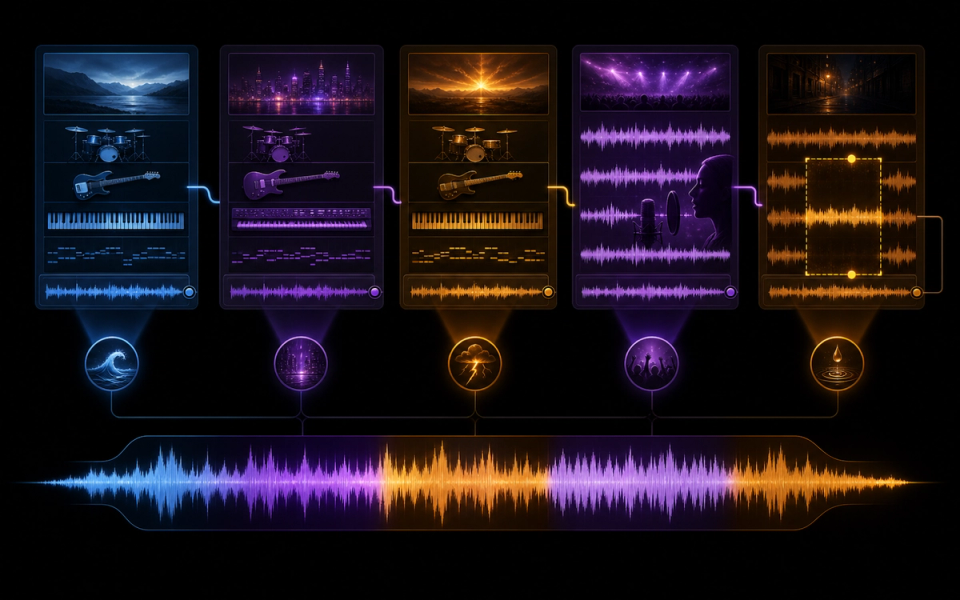
Step 2: Design the whole arc
Longer duration is useful only when sections perform different jobs. Map changes in information, harmony, density, and dynamics. Make one decision at this stage, record it, and carry the result into the next step. That discipline makes later comparisons more useful because the project has a visible chain of intent.
Step 3: Generate the base track
Listen for a stable musical identity across the full piece before spending time repairing local details. Make one decision at this stage, record it, and carry the result into the next step. That discipline makes later comparisons more useful because the project has a visible chain of intent.
Step 4: Choose a bounded edit
Identify the exact section and its failure: weak lift, crowded vocal, abrupt transition, or unsatisfying ending. Make one decision at this stage, record it, and carry the result into the next step. That discipline makes later comparisons more useful because the project has a visible chain of intent.
Step 5: Write a local instruction
Preserve what works on either side and describe the new section’s role, palette, and transition behavior. Make one decision at this stage, record it, and carry the result into the next step. That discipline makes later comparisons more useful because the project has a visible chain of intent.
Step 6: Compare in context
An improved isolated section can still harm continuity. Listen across both joins and then through the entire song. Make one decision at this stage, record it, and carry the result into the next step. That discipline makes later comparisons more useful because the project has a visible chain of intent.
How to review the result
Use the same checklist for every candidate. First listen from beginning to end without touching the controls. Then listen for the destination: under narration, against picture, inside gameplay, or as a standalone song draft. Context can reverse a judgment; an exciting standalone cue may be distracting under speech, while a restrained cue may perform its job extremely well.
- Feature provenance: Each product statement is supported by a current official source rather than memory or promotional shorthand.
- Long-form coherence: Motifs and tonal center remain related while later sections introduce meaningful development.
- Edit containment: The repaired passage solves the named problem without weakening adjacent material.
- Vocal suitability: Language, pronunciation, phrasing, and identity are reviewed by a competent human listener.
- Version traceability: Original, edit, prompt, date, account tier, and intended use remain linked in the project record.
Score each criterion with a short note rather than one overall number. The notes reveal trade-offs and give the next prompt a specific task. Save rejected versions long enough to compare them; otherwise novelty and recency can masquerade as improvement.
Evidence and limits of this guide
This tutorial is based on current official ElevenLabs product documentation and Music Terms, not a controlled performance benchmark. It explains a reproducible editorial workflow without claiming that every account, language, prompt, or output will behave identically. Product access, limits, pricing, and terms can change after publication.
Before releasing a project, save the prompt, output, account tier, generation date, product settings, intended use, and the terms you reviewed. Listen in the real destination and record at least one limitation. That project-specific evidence is more useful than treating any general tutorial as a guarantee.
If this workflow fits your project, Try ElevenLabs Music after checking the current product details and terms. The link is sponsored, but the review criteria above stay the same whether or not you open an account.
Common mistakes and focused fixes
Treating an announcement as a test result
State what ElevenLabs announced and separately label what your own evidence demonstrates. Return to the brief, identify the smallest relevant variable, and compare the revision with the previous version in context.
Making the song longer without development
Add section purpose, not repeated duration. Return to the brief, identify the smallest relevant variable, and compare the revision with the previous version in context.
Editing before choosing a baseline
Preserve a complete original so the revision can be compared fairly. Return to the brief, identify the smallest relevant variable, and compare the revision with the previous version in context.
Judging a section alone
Music inpainting succeeds only if both transitions and the whole-song arc still work. Return to the brief, identify the smallest relevant variable, and compare the revision with the previous version in context.
Freezing volatile details in copy
Pricing, plan access, and licensing need a publication-day verification pass. Return to the brief, identify the smallest relevant variable, and compare the revision with the previous version in context.
Connect this workflow to a wider music practice
Generation is one part of a larger creative process. Compare this method with Doldur Music’s guide to AI music trends creators should watch, then explore AudioCipher songwriting guide. Before any public or commercial use, read our coverage of how AI is changing music licensing and verify the current controlling terms yourself.
Keep the human decisions visible: why the track exists, which references were translated into attributes, what was edited, who reviewed language or rights, and why the final version was selected. Those notes make the creative work easier to continue and the editorial claims easier to defend.
Frequently asked questions
What is Eleven Music v2?
It is the current generation of ElevenLabs’ music product described in the official announcement and documentation. Check those sources for the latest feature and access details.
Can Music v2 edit only one part of a song?
ElevenLabs documents section-level editing or inpainting. The exact workflow and availability should be verified in the current product before publication.
Does Music v2 support songs with vocals?
The official announcement describes vocal and multilingual capabilities. Human review of lyrics, pronunciation, consent, and output quality remains necessary.
Is Music v2 available through the API?
ElevenLabs has announced Music v2 API availability. Consult the current API documentation for model names, parameters, limits, and access.
Conclusion
The strongest Eleven Music v2 workflow is a loop of briefing, generating, listening, and focused revision. Define the destination, preserve evidence, judge the output in context, and verify rights close to release. If you want to test the process yourself, Try ElevenLabs Music; keep the prompt and result so your second pass is based on evidence rather than guesswork.
Sources and further reading
- ElevenLabs: Introducing Music v2Official overview of Music v2 and its announced capabilities.
- ElevenLabs Music documentationCurrent product workflow and feature reference; recheck immediately before publication.
- ElevenLabs Music TermsControlling usage and licensing terms; recheck immediately before publication.
- ElevenLabs composition plans guideOfficial guide to ordered sections and composition-plan generation.