guide
Best AI Sample Generators for Producers
Compare current AI sample tools by generation method, DAW workflow, export, licensing, privacy, and whether you need a loop, layered idea, or full track.
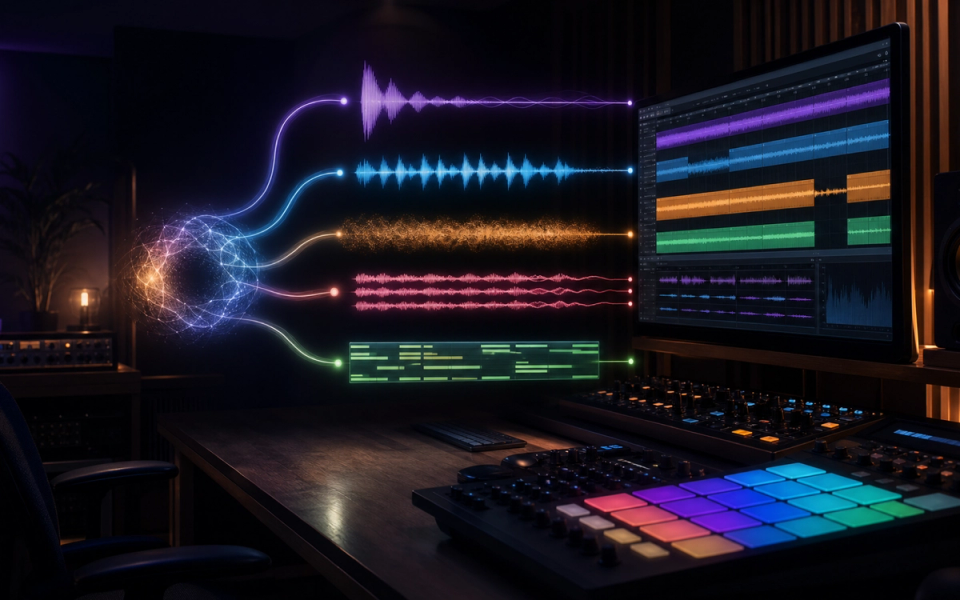
The best AI sample generator depends on what “sample” means in your session. Output Co-Producer is the clearest current choice for finding and generating variations that fit an existing track. Stable Audio is better for prompt-based audio clips and sound design. Splice Create builds layered ideas from a licensed catalog rather than generating every waveform from scratch. Jen and Eleven Music are stronger when the useful sample should begin as a longer composition or downloadable stem.
That distinction matters. AI sample generation, AI sample discovery, loop stacking, audio continuation, and full-song generation solve different problems. A product can be excellent at one and frustrating at another.
Key points
- Choose the output first: one-shot, loop, layered stack, stem, or complete track.
- Confirm whether the tool generates new audio or recommends existing catalog samples.
- Prefer key, tempo, duration, and reference-audio controls when the result must fit a session.
- Check file format, maximum duration, stem export, and drag-to-DAW workflow.
- Read the license for the exact plan used when the audio was generated.
- Keep prompts, generation dates, receipts, terms, and source-project files with released music.
- Edit the result. AI output is raw production material, not automatic clearance or a finished arrangement.
How we selected these tools
This comparison uses current official product, support, licensing, and shutdown documentation. We evaluated the job each product performs, how audio enters and leaves it, what control the producer retains, and what the provider says about training and commercial use.
We did not conduct a controlled listening test across every plan and genre, so there is no invented “best sounding” score. Perceived quality changes with the prompt, duration, source material, model version, arrangement, and processing. The useful comparison is whether a tool returns the right kind of editable material for your workflow.
Two formerly prominent products require warnings. Aux now displays a shutdown notice, so LoopLM is not a viable new workflow. Samplab says its online service and older versions will stop working on September 17, 2026, with limited offline options for eligible users. A current shortlist should not recommend either as a dependable new subscription.
Output Co-Producer: best fit for an existing track
Output Co-Producer is a plugin that searches for samples using text, captured session audio, or both. Its official guide says it analyzes harmonic and rhythmic context, previews results in the session key and tempo, and lets the producer drag samples into a DAW.
The Re-imagine feature makes it more than a search engine. Output says it transforms royalty-free, musician-made source samples into new variations using a model trained on Output’s catalog and Creative Commons material. This is the closest current replacement for a producer who liked LoopLM’s promise of unique, usable loops but wants stronger session context.
Choose Co-Producer when:
- A loop must complement music already playing.
- Text alone cannot describe the required groove or harmony.
- Auditioning in key and tempo is more important than generating a full song.
- Direct drag-and-drop matters.
- You also use Arcade and want the connected kit workflow.
There is a privacy tradeoff. Output says captured audio is uploaded for cloud analysis. It is not used to train generative models, but may be analyzed to improve recommendations unless the account opts out; opting out also deletes stored audio files. Do not capture unreleased client work until that policy fits the project agreement.
Stable Audio: best for prompt-based clips and sound design
Stable Audio generates music and sound effects from text and supports uploaded-audio workflows. Its own About page explicitly suggests using outputs as samples in your music. That makes it useful for textures, transitions, percussion ideas, ambiences, and longer material that can be cut into a loop.
Stable Audio is a better fit than a catalog search tool when the target sound is unusual: a processed mechanical rhythm, evolving drone, hybrid instrument, environmental texture, or narrowly described production element. Generate several versions, trim the strongest moment, correct the loop boundary, and process it like any other recording.
The official FAQ currently states that free users receive a monthly generation allowance, while commercial use requires an eligible paid subscription. It also says uploaded audio is not added to the training dataset, although generated audio may be used to improve models. Uploads are scanned for potentially copyrighted material and may be rejected.
Choose Stable Audio when:
- Text-to-audio is the primary workflow.
- You need sound design as well as musical loops.
- Audio upload or variation is useful.
- You are comfortable editing a rendered file after generation.
Verify the live pricing and license page on generation day. Do not assume a free generation can be moved into a commercial release after upgrading later.
Splice Create: best for layered loop discovery
Splice Create is not a pure text-to-waveform generator. Splice describes it as an AI-powered discovery tool that builds unique stacks from its sample library. A producer chooses a style, cycles through combinations, mixes up to eight tempo- and key-matched layers, and exports the result for further work.
That makes Create useful when the production problem is arrangement density rather than a single novel sound. It can quickly expose which roles are missing—percussion, bass, harmony, texture, or top line—without requiring the producer to search each category separately.
Choose Splice Create when:
- You already use Splice Sounds.
- Layered, compatible material is more valuable than a generated one-shot.
- You want identifiable catalog sources and established sample licensing.
- Fast arrangement sketches matter.
The limitation is originality at the waveform level. The stack may be a unique combination, but its individual catalog samples can also appear in other releases. Transform exposed melodic loops, keep license records, and avoid building a track around one recognizable sample without meaningful editing.
Jen: best for licensed-training claims and stem harvesting
Jen positions itself as a full music co-producer rather than a dedicated loop box. Its feature documentation includes generation, structural editing, stem downloads, folders, bulk downloads, and StyleFilters. A producer can generate a longer instrumental, download components, and turn a drum, bass, or texture stem into production material.
The differentiator is its training-data position. Jen says its dataset is licensed and legally cleared, StyleFilters are built from rights-holder-authorized tracks, and generated material is checked against a large reference catalog. Those are provider claims, not a universal copyright guarantee, but they are relevant when procurement or artist policy requires a documented training story.
Choose Jen when:
- You want stems from a generated composition.
- Training-data sourcing is part of the buying decision.
- A longer musical context will produce a better sample than a short isolated prompt.
- StyleFilter compensation and provenance are useful to the project.
Always preserve the applicable terms and generation record. Jen notes that copyright protection still depends on the law in the relevant jurisdiction.
Eleven Music: best for structured sections and longer source material
Eleven Music v2 generates instrumental or vocal music from natural-language prompts and supports section-by-section editing. Its documentation lists durations from three seconds to five minutes, positive and negative style controls, inpainting, and export. That range lets a producer ask for a short fill or build a longer composition, then sample a useful section.
Use Eleven Music when structure matters: an eight-bar intro that develops, a transition into a chorus, a rhythmic breakdown, or a texture that changes over time. It is less direct than Co-Producer for matching an open DAW session, but stronger when the sample needs an internal beginning, development, and end.
The official documentation says export quality and commercial permissions vary by plan. Standard exports may be compressed, so verify whether the plan provides the format and fidelity needed before doing detailed mix work.
A practical decision guide
Start with the production constraint:
- For a loop that fits an existing mix, start with Output Co-Producer.
- For an original sound effect, texture, or prompt-driven clip, start with Stable Audio.
- For a multi-layer sketch from licensed catalog material, use Splice Create.
- For stems generated from a broader composition with explicit licensed-training claims, evaluate Jen.
- For structured sections, inpainting, or longer source material, evaluate Eleven Music.
If you need editable notes rather than rendered audio, use an AI MIDI tool instead. Audio generation commits early to timbre, performance, and mix decisions; MIDI keeps pitch, timing, velocity, instrument choice, and voicing editable.
Workflow: turn generated audio into a usable sample
- Define the role. Write one sentence describing instrument, register, rhythm, mood, key, tempo, length, and what the sound must avoid.
- Generate short candidates. Shorter outputs are faster to compare and less likely to wander away from the intended role.
- Audition in context. A soloed loop can sound impressive while masking the vocal or fighting the bass.
- Check timing and pitch. Confirm the detected BPM and key rather than trusting a label.
- Edit the boundary. Use zero crossings, short crossfades, and a tail long enough for reverb or delay.
- Remove low-end or stereo information the arrangement does not need.
- Commit a lossless working file before further stretching or processing.
- Rename the file with tool, date, prompt ID, BPM, key, and version.
- Save the terms, plan receipt, prompt, and generation page with the project.
- Add human arrangement decisions: chopping, resampling, automation, performance, layering, or synthesis.
For more rights context, read Doldur Music’s guide to AI, music licensing, and creation. If you are replacing an older Aux workflow, our indexed LoopLM overview preserves the product context while the current alternatives guide handles migration.
Licensing checks before release
“Royalty-free,” “commercial use,” and “you own the output” are not interchangeable. Check whether the plan permits commercial music releases, client work, advertising, film and television, games, resale as a sample pack, sublicensing, model training, and Content ID registration.
Also distinguish rights in the generated recording from copyright protection for the composition. A service agreement can grant permission to use a file without guaranteeing that the result receives copyright protection or cannot resemble another output. For high-value releases, ask qualified counsel about the project rather than treating a product FAQ as legal advice.
Frequently asked questions
What is the best free AI sample generator?
Stable Audio currently documents a limited free allowance, but its FAQ says commercial use requires an eligible paid plan. Free is suitable for evaluation, not automatic release clearance. Plan details change, so confirm them before every commercial project.
Can AI-generated samples be used commercially?
Sometimes. Permission depends on the provider, subscription tier, generation date, territory, and use. Save evidence of the terms that applied when the sample was created.
Is Splice Create an AI sample generator?
It is more accurately an AI-assisted sample discovery and loop-stacking tool. It combines material from Splice’s catalog rather than claiming that every individual waveform is newly generated.
What happened to LoopLM?
LoopLM was part of Aux Sounds. Aux now displays a shutdown notice and says user files were deleted by March 31, 2026, so it should not be selected for a new production workflow.
Should I generate a loop or a full track and sample it?
Generate a short loop when the role is precise and repetition is the goal. Generate a longer section when development, transitions, or interactions between instruments may produce better source material.
Verdict
Output Co-Producer is the most production-specific choice because it can use the actual session as context and create variations for direct DAW use. Stable Audio is the flexible text-to-audio option. Splice Create is the practical layered-discovery tool. Jen and Eleven Music make more sense when stems or structured long-form audio are the source.
The durable method is not loyalty to one model. Define the required output, verify current rights, generate narrowly, edit decisively, and archive the evidence behind every sample that reaches a release.
Sources and further reading
- Output Co-Producer User GuideCurrent sample discovery, audio analysis, Re-imagine generation, DAW workflow, and uploaded-audio handling.
- Stable Audio FAQsGeneration allowances, uploads, model-training statements, and tier-dependent commercial use.
- Splice Create HelpAI-assisted loop discovery, layered stacks, tempo and key matching, and DAW export.
- Jen FeaturesGeneration, editing, stem downloads, StyleFilters, folders, and bulk download workflow.
- Jen EthicsJen's claims about licensed training data, output screening, and ownership limitations.
- Eleven Music DocumentationCurrent Music v2 generation, editing, duration, export, tier, and commercial-use documentation.
- Aux Shutdown NoticeCurrent shutdown status for Aux and LoopLM.
- Samplab Shutdown NoticeSeptember 17, 2026 service end and offline-version guidance.