guide
How to Create a Landing Page for a New Song Release
Build a focused landing page for a new song with approved artwork, clearly labelled service links, a mobile-first hierarchy, and a release-day update plan.
Disclosure: Doldur Music may earn a commission if you sign up for Promake through links in this article, at no additional cost to you. We describe only features we could verify from current public information.
A music landing page gives a new song one permanent, owned destination. Before release day it can explain what is coming. After launch it can send listeners to the official Spotify, Apple Music, YouTube, Bandcamp, or store pages. Later it can remain as an accurate release archive instead of expiring with the campaign.
The page does not need every promotional asset. It needs verified release information, one primary action, clear service labels, enough context to reward the click, and a URL that will still make sense after launch.
Key points
- Choose one campaign goal before arranging the page.
- Prepare artwork, title, artist credit, release date, copy, credits, and official links as one checked asset pack.
- Use one primary action and group secondary services beneath it.
- Keep the final release URL stable before and after launch.
- Replace pre-release language and destinations when the song becomes available.
- Treat pre-save, automatic service matching, and fan analytics as specialist features that must be verified separately.
Choose the campaign goal
A release page can support listening, watching, buying, pre-ordering, reading the story, or joining a list. It should not give all of those actions equal visual weight.
Choose the goal that matches the release:
- Listen now for a live single available across services.
- Watch the video when the visual is the main release event.
- Buy the physical edition when a limited product leads the campaign.
- Read the release story when context is the reason to visit the owned page.
- Pre-order when a verified store or distributor supports it.
- Pre-save only through a provider that explicitly supports the action for the relevant services.
Write the goal at the top of the production notes. Every section should either support that action or answer a question that would stop the visitor from taking it.
Prepare the release asset pack
Collect the final material before building the music landing page:
- exact artist and featured-artist names;
- song title and version information;
- approved cover artwork;
- confirmed release date;
- one-sentence description;
- a short release story or production note;
- writers, producers, performers, and other approved credits;
- official service and video URLs;
- label, catalogue, or copyright information when relevant;
- approved artist and press contact;
- descriptive artwork alternative text.
Use the distributor delivery sheet or another approved release record as the factual source of truth. A stylized page title can be expressive, but the artist, track, date, and version must agree across the website and official services.

Do not publish guessed platform URLs. Some service pages appear late or change during delivery. Mark missing destinations internally and add them only after checking the exact release.
Choose a permanent release URL
Use a path that can stay live after the campaign, such as /music/song-title/ or /releases/song-title/. Avoid putting “pre-save,” a date, or a tracking code in the canonical path.
Before launch, the same URL can show artwork, verified release facts, and the current campaign action. On release day, update the buttons and language without moving the page. Afterward, keep it as the release record.
If a separate pre-save URL exists, link or redirect it to the permanent page when the campaign ends according to the provider’s options. Do not create a chain of temporary pages that makes press coverage and old social posts point to dead destinations.
The Doldur Music Release SEO Kit can generate editable metadata, structured data, and an implementation checklist for an existing release page. It stores nothing and does not publish the page.
Build the mobile music landing page hierarchy
The first screen should answer four questions:
- Who released this?
- What is the song?
- Is it available now?
- What should I do next?
A practical order is:
- Artist name and song title
- Artwork
- Primary action
- Secondary service buttons
- One short release description
- Video or approved media
- Credits
- Artist, release archive, and contact links

Keep the artwork prominent without letting it push every action below the first screen on a phone. Label each service button with a verb and destination. An icon alone can be ambiguous, and an unlabelled logo is less accessible.
Write release copy that earns its space
The introduction should add something the streaming listing cannot. Two or three specific sentences are usually enough.
Useful details include:
- the scene, image, or question behind the song;
- the instruments or recording approach;
- a collaboration and each person’s role;
- where the song sits in a larger release;
- the intended version, edit, or mix;
- a lyric line only when the artist owns the rights and approves its use.
Avoid generic phrases such as “highly anticipated,” “genre-defying,” or “set to take the world by storm.” They do not help a listener understand the music, and they create unsupported claims.
If the artist has not approved a story, publish the verified facts and keep the page concise.
Add manual Spotify, Apple Music, and YouTube buttons
For a straightforward owned page, add the official destinations manually. Use labels such as:
- Listen on Spotify
- Listen on Apple Music
- Watch on YouTube
- Buy on Bandcamp
- Order the physical edition
Open every URL on a phone and a desktop. Confirm it reaches the correct artist, title, and version. Avoid a search-results page, artist homepage, or unofficial upload when the campaign promises the release itself.
A page with several manually maintained buttons is a multi-platform landing page. It should not be described as automatically finding services, creating deep links, running a pre-save, or collecting fan analytics.
When those features matter, use a dedicated service and connect it from the owned page.
Decide whether to use a domain or release path
Most artists should keep the release under the main artist domain. That connects the campaign to the biography, catalogue, shows, EPK, and contact information. It also gives future links a predictable home.
A separate campaign domain can make sense for a substantial collaborative project or independent property, but it creates another domain to renew, maintain, and explain. Choose it for a durable reason, not because a launch should look bigger.
Promake currently documents hosted publishing and custom-domain management. Confirm the current plan, domain price, renewal terms, and connection steps before using it for a release. Do not freeze those details into evergreen copy.
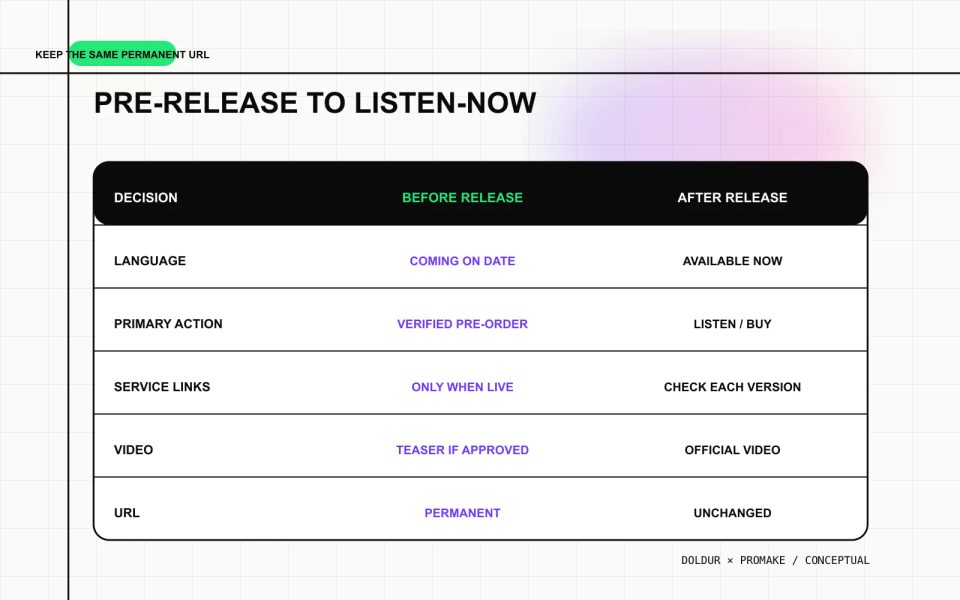
Update the page on release day
The page should change state when the song becomes available.
Before release:
- state the correct date;
- use only a verified pre-order or pre-save action;
- avoid buttons that lead to unavailable pages;
- explain what will happen at launch.
After release:
- replace future tense with current language;
- make the primary listening or buying action live;
- add verified service destinations;
- embed or link the official video;
- confirm the artwork, title, credits, and date;
- keep the same canonical URL.
Do not leave “out Friday” on the page for months. Add an update reminder to the release plan and assign the change to a person.
Test the music landing page on a phone
Run the page outside the builder preview. A useful test takes less than five minutes:
- load the public HTTPS URL;
- confirm the primary action appears quickly;
- check artwork crop and file size;
- read the title and introduction at a narrow width;
- open every listening destination;
- test keyboard focus and contrast;
- confirm alternative text;
- check the social-sharing image;
- verify the contact or artist-page route;
- remove placeholder and expired buttons.
For search readiness, confirm the page has one clear heading, a unique title and description, a self-referencing canonical, crawlable HTML, useful internal links, and sitemap inclusion. These elements help discovery and interpretation; they do not guarantee indexing or rankings.
For the wider site build, use the musician website guide. If the campaign needs one URL across several services, compare this manual page with the music smart-link workflow. The existing Doldur tool and public release catalogue remain useful for release metadata and destination checks.
Build the page with Promake
Promake’s public documentation describes creating a website through conversation, visual editing, hosted publishing, domain management, and payment or commerce capabilities on eligible plans. For this job, position it as the builder for the owned release page.
Give Promake the approved asset pack, the page order, the primary action, and the exact service labels. Instruct it not to invent quotes, reviews, play counts, credits, or platform availability. Review the generated copy and replace anything the artist did not provide.
If that workflow fits the campaign, build the owned release landing page with Promake. Use a specialist music-link or pre-save service when automatic platform functions are required.
Keep the release page after the campaign
The best release page is still useful six months later. Preserve the URL, update broken destinations, add genuine post-release material, and link it from the artist profile and catalogue. The campaign ends; the release record should not.
FAQs
What should a music landing page include?
Include verified artist and song names, artwork, availability or date, one primary action, official service links, a short description, selected credits, and routes back to the artist and contact information.
Is a music landing page the same as a smart link?
Not necessarily. A manual landing page can place several service buttons under one URL. Automatic matching, deep linking, pre-save, analytics, and fan capture require features explicitly supported by the chosen provider.
Should a release landing page use a separate domain?
Usually the artist’s existing domain and a permanent release path are simpler. A separate domain adds cost and maintenance and is most useful when the project has a durable identity of its own.
Can I publish the page before the song is live?
Yes, if the visible information is approved and the current action is honest. Do not display inactive listening buttons or call a simple signup link a pre-save.
What should change after release day?
Update future-tense copy, activate verified listening or buying links, add the official video when available, and keep the same permanent URL.