guide
How to Build an EPK Website for Musicians
Build an electronic press kit website with a concise bio, music, approved photos, live proof, credits, downloads, and a direct booking contact.
Disclosure: Doldur Music may earn a commission if you sign up for Promake through links in this article, at no additional cost to you. We describe only features we could verify from current public information.
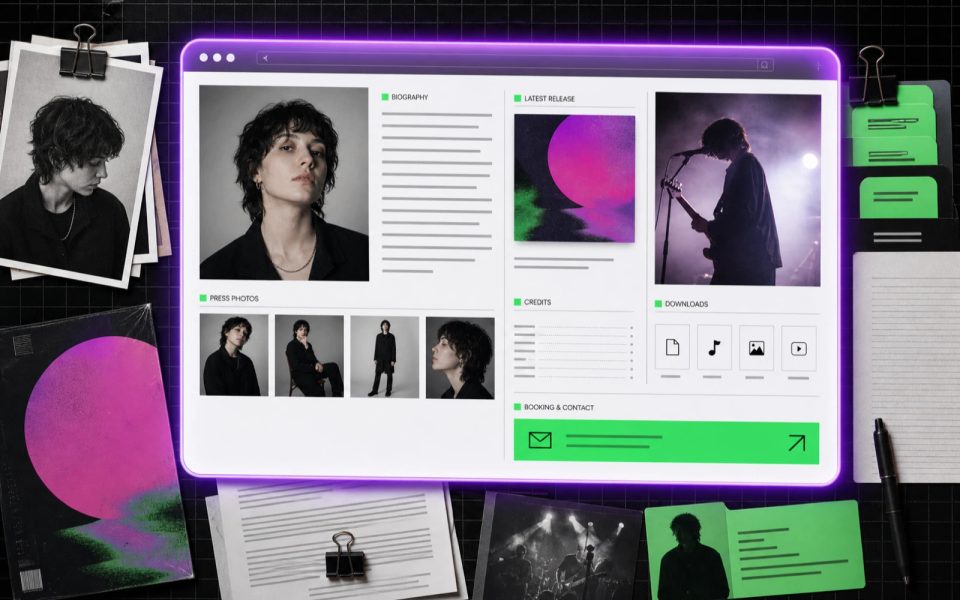
An electronic press kit website gives journalists, promoters, festivals, and music supervisors a fast way to evaluate an artist and retrieve approved material. A useful EPK website is not a fan homepage with a download button. It is a compact working package: clear identity, current music, credible live evidence, accurate facts, rights-cleared assets, and a direct professional contact.
Build it for the recipient’s deadline. Put the strongest, most relevant proof first, keep files easy to download, and remove anything that requires the reader to guess.
Key points
- Design the EPK around press and booking questions, not around the artist’s full history.
- Lead with identity, current work, and the strongest relevant proof.
- Provide short and long biographies, approved photos, music, live video, credits, and contact.
- Name files clearly and preserve photographer, artwork, and video credits.
- Test every download and media link without a logged-in account.
- Update the EPK whenever lineup, release, show format, contact, or rights information changes.
Who reads a musician EPK?
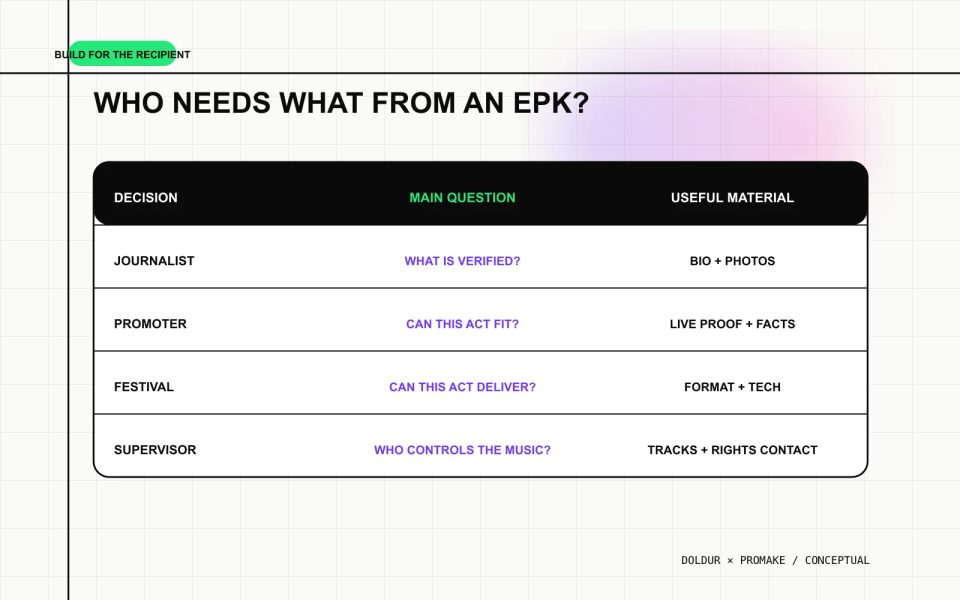
An EPK can serve several professional readers, but they do not need identical evidence.
Reader
Main question
Useful material
Journalist
What is the verified story, and which assets can I use?
Biography, release facts, press photos, credits, contact
Promoter
Is this act right for the room, and can I reach the booker?
Live video, lineup, location, show format, technical context, booking
Festival team
Can the act fit the program and operational plan?
Current music, live proof, touring scope, team contact, technical documents
Music supervisor
Is the music relevant, and who controls or represents it?
Selected tracks, credits, rights contact, instrumental or clean versions when approved
Do not overfill the kit to satisfy every possible use. Put the shared essentials on the page and provide role-specific details or downloads only when the artist actually has them.
Start with a one-screen artist summary
The top of the EPK should let a recipient identify the project in seconds. Include:
- artist or band name;
- one-line description in the artist’s own language;
- location or touring base when relevant;
- current release or campaign;
- one strong approved image;
- a prominent music or live-video action;
- direct booking or press contact.
Avoid animated introductions, vague slogans, and an unlabeled “Enter” button. The reader may be opening the page between emails, on a phone, or moments before a meeting.
If the page is separate from the fan website, link back to the public artist home without forcing the recipient through it first.
Prepare a short and long biography
Provide two usable versions:
- a short biography of roughly 80–150 words for quick listings and introductions;
- a longer biography when the project has a story that supports features, proposals, or program notes.
Both versions should agree on names, roles, location, timeline, and current work. Write the short version first. If it cannot explain the project without inflated language, the longer version will not solve the problem.
Include only claims that can be attributed or verified. A real festival appearance, collaboration, label, or credited role is useful. “One of the most exciting artists of a generation” is not useful unless it is a short, attributed press quote from a credible source and the artist has permission to reproduce it.
Select the music for the EPK website
Choose music that helps the recipient assess the current project. One to three tracks are often more useful than an embedded catalogue.
For each selection, state:
- title and release;
- artist and featured artists;
- the artist’s role;
- release date;
- official listening or viewing destination;
- context that matters to the recipient.
Use approved audio or video. Do not upload files for redistribution unless the artist controls the necessary rights. When a private preview is required, use an appropriate access-controlled service and test the recipient experience.
Show live performance evidence
For booking work, a current live video is often more useful than a heavily edited music video. It shows the act’s lineup, stage presence, instrumentation, room scale, and performance format.
Choose a clip with:
- recognizable audio;
- a clear view of the performers;
- a lineup that matches the current act;
- a representative set or song;
- a working public or appropriately private link;
- date and venue context when approved.
Do not label a rehearsal, mimed performance, or old lineup as current live proof. If no suitable video exists, state that the section is awaiting an approved asset rather than filling it with unrelated footage.
Organize press photos and artwork
Provide a small selection of high-resolution approved images. Variety is useful when it serves layout needs: portrait, landscape, full-band, and live image. Ten near-identical edits create work for the recipient without improving choice.
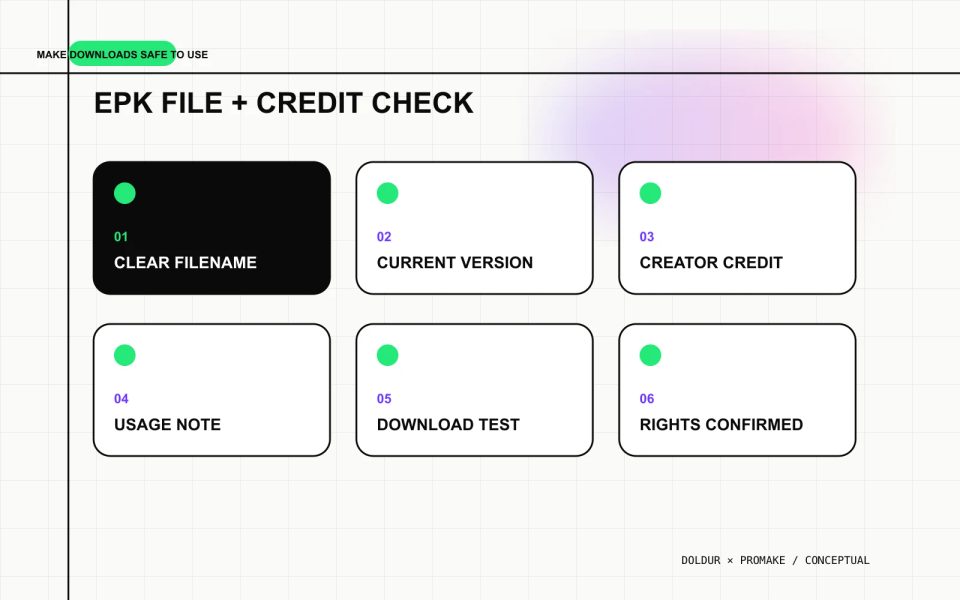
Each download should include:
- descriptive filename;
- artist name;
- photographer or creator credit;
- orientation or dimensions where useful;
- usage note or restrictions;
- contact for questions.
Keep credits visible on the page and, where practical, with the downloaded file package. Do not remove a required credit or imply that an image is free for any use.
Put the EPK in a practical order
A strong default sequence is:
- Artist identity and current focus
- Primary music or live proof
- Short biography
- Current release and selected credits
- Press photos and artwork
- Additional live video
- Relevant press or verified milestones
- Practical booking or technical information
- Downloads
- Direct contact
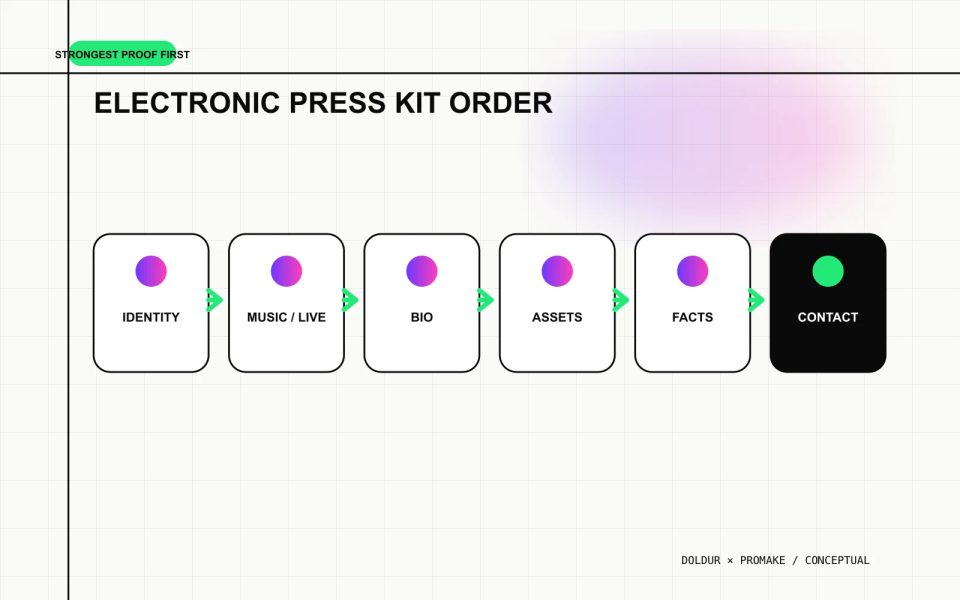
Move sections when the recipient’s decision requires it. A festival pitch may place live evidence and practical facts earlier. A release press kit may lead with the new record, production story, and images.
Include practical booking facts
When the EPK supports booking, state the facts that affect fit:
- current lineup and roles;
- home base or touring region;
- typical set format or duration when approved;
- live video;
- technical-document link;
- accessibility or production needs that must be known;
- booking contact.
Keep detailed stage plots, input lists, hospitality information, or travel documents as current downloadable files when they are genuinely required. Date them and name the version. An old technical rider can create real problems at a venue.
The EPK website should not claim to manage enquiries, calendars, deposits, contracts, or reminders unless a verified connected system provides those functions.
Make downloads easy to use
Use human filenames such as:
artist-name-short-bio-july-2026.docxartist-name-press-photo-landscape-photographer.jpgartist-name-stage-plot-2026.pdf
Avoid IMG_4827-final-final.jpg or a single unlabeled archive containing unknown rights and outdated material.
Test each file:
- download without being logged in;
- open on a common phone and desktop;
- confirm the file is not corrupted;
- check names, dates, and credits;
- confirm the image resolution;
- remove private or hidden metadata when appropriate;
- verify that the public has permission to receive it.
Create a direct professional contact
Label the route by purpose: Booking, Press, Management, Licensing, or General enquiries. Include a named representative only with approval. A role-based email can remain stable when the team changes.
If a form is used, explain what information is needed and who receives it. Test delivery from outside the organization. A polished form that sends nowhere is worse than a plain working email address.
Promake currently documents custom domains and professional email options. Confirm current pricing, availability, and setup terms immediately before using them.
Build and maintain the EPK with Promake
Promake’s public documentation describes a conversational website builder, visual editing, hosted publishing, domain management, and email options. That can support the page, layout, and contact layer of an EPK.
Give the builder the approved biography, images, artwork, music destinations, live video, credits, practical facts, downloads, and contact. Tell it not to invent reviews, festival appearances, awards, listener counts, clients, or booking outcomes.
The public evidence does not establish automatic streaming imports, artist-bio writing based on platform profiles, audio hosting, file-rights management, or native booking administration. Keep those tasks with the people and tools responsible for them.
Use the musician website guide for the owned-site foundation, the band website guide for promoter-facing structure, and the producer portfolio guide for role-specific project proof.
If the assets are ready, build your EPK website with Promake. Review the public page as a journalist and promoter before sharing it.
Update the EPK as a working document
Review the kit after every significant release, lineup change, new live video, contact change, or technical update. Remove old claims rather than piling new facts on top.
Add a visible or internal “last reviewed” date to downloads that can become operationally stale. Assign one person to own the electronic press kit website. The most impressive EPK is the one the recipient can trust.
FAQs
What should be included in an electronic press kit website?
Include artist identity, short and long biographies, selected current music, live video, approved press photos, credits, relevant practical facts, usable downloads, and direct professional contact.
Should an EPK be a PDF or a website?
A website is easy to update and share; PDFs can be useful as downloadable summaries or technical documents. Use the web page as the current source and keep any PDF version dated and consistent.
How many press photos should an EPK include?
A small set of genuinely different approved images is enough for most artists. Include portrait and landscape options, visible credits, clear filenames, and any usage restrictions.
Does an EPK need a private page?
Not always. Public facts and approved images can be public. Use appropriate private delivery for unreleased music, confidential documents, or material with limited access, and test it from the recipient’s perspective.
How often should a musician update an EPK?
Review it after releases, lineup or team changes, new live footage, major booking changes, and technical-document updates. At minimum, check contacts, links, and dated material before every outreach campaign.